
Make it yours
Memory: control what Neurothread remembers about you
Review, edit, pause, or delete personal memory and understand how saved facts are used in later conversations.
Before you start
Section titled “Before you start”Check the Remember things about me switch in Settings → Memory to see whether Memory is enabled for your account. When enabled, it learns lasting information that you state about yourself in your own messages and can use it in later conversations—for example, your preferred response style or ongoing work. It does not learn from documents, model answers, or other people’s text. Memory is private to your user account and is separate from any agents’ memory.
Memory is not the same as Improve decision models in Settings → General. That separate preference concerns requests to decision models and what you do next; it does not control personal Memory.
When to use this
Section titled “When to use this”Use Memory when you want Neurothread to remember stable preferences or background between conversations. Review it when your role, goals, or preferences change. Leave it on if you want saved details used in later chats; switch it off if you want Neurothread to stop both learning and using those details while keeping them available for later.
- Open Settings → Memory. The switch Remember things about me controls whether saved Memory is active.
- Review the sections: Communication preferences, Work and business, Goals, Family, and Personal. The Personal section is always sensitive. Other sections can also be marked Treat as sensitive.
- Edit a section’s Summary and choose Save when it no longer describes you accurately. Summaries condense useful details; check that the wording remains correct.
- To preserve an exact instruction, add an Always remember note. You can also tell the assistant in a conversation, “Remember that I prefer concise answers.” Notes are kept as written and are not rewritten automatically.
- Remove outdated Learned recently items with their remove control. Review the section’s Earlier versions and choose Restore if you need to bring back a previous summary.
- Turn on Treat as sensitive for a section containing private details. Sensitive sections are only used when your message brings up that subject. The Personal section is always sensitive and only enters context when your message raises a related topic.
- Switch off Remember things about me to stop both learning and use. Existing data remains stored. To erase it, use Delete section for one section or Delete all memory and confirm. Either action also deletes the saved summary history for the affected section or sections, so that history cannot be restored afterward.
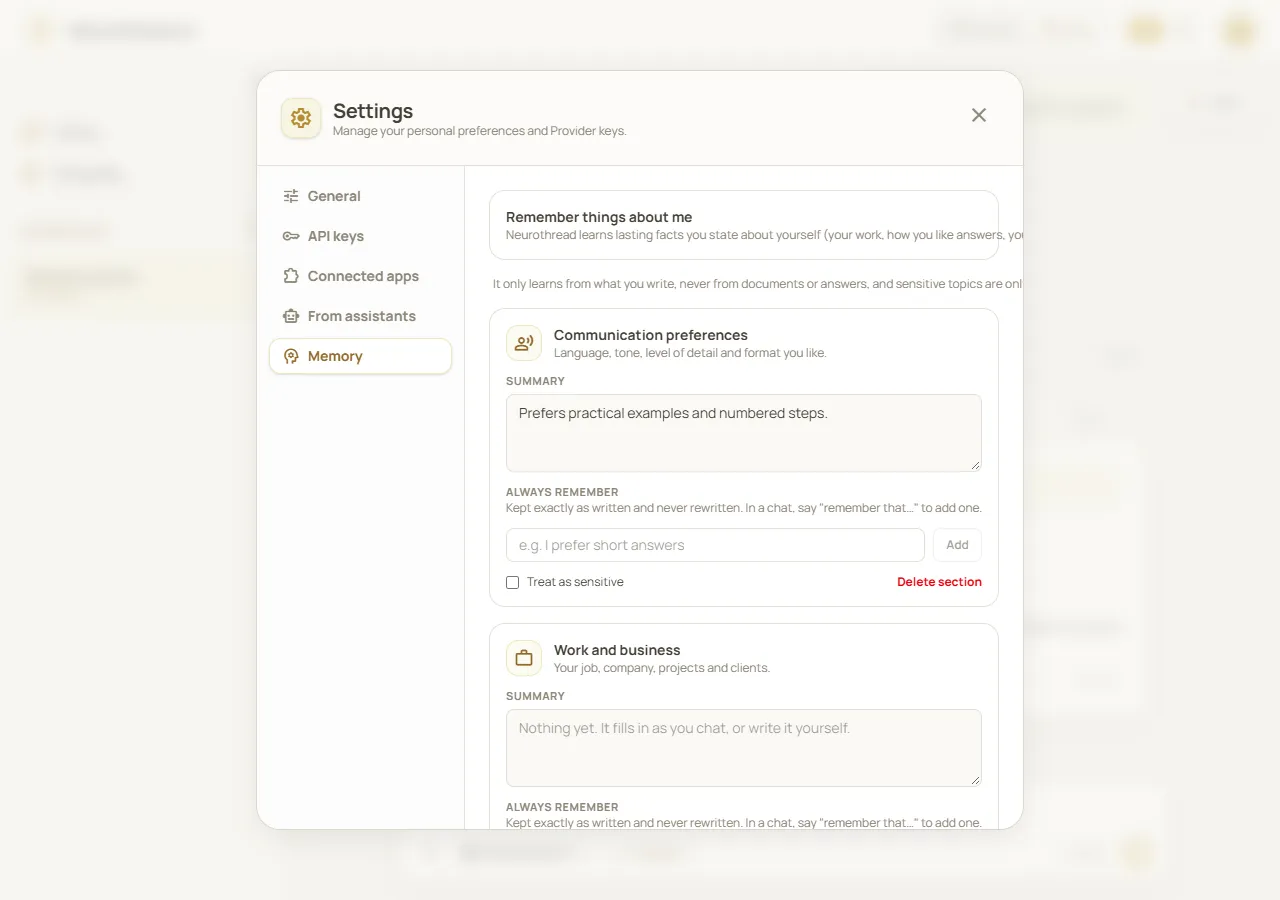
Review saved preferences in Settings → Memory. Fictional demonstration data; simulated API, not a real person’s stored information.
Worked example
Section titled “Worked example”You prefer concise answers with a short action list. In a conversation, say: “Remember that I prefer concise answers and a short action list.” Open Settings → Memory, find the communication-preferences section, and check the saved note. If you later want more detail, edit the summary or add a new note. To stop Memory from affecting new chats without erasing it, switch off the main control instead of deleting the section.
What happens next
Section titled “What happens next”When Memory is active, relevant saved information can be included in later conversations. Learning happens from your own messages when they contain lasting personal information; it is not a transcript of every chat. Summaries are consolidated over time, and you can inspect, edit, restore, or remove what is saved. If you see Needs review, inspect the section and use Mark as reviewed after checking it; automatic updates for that section are paused until review.
Cost and limitations
Section titled “Cost and limitations”The control Remember things about me stops both learning and use but preserves saved data. A separate learning pause can stop new learning while existing Memory remains in use; if the interface says “Learning is paused for now. What is saved is still used,” that is not the same as switching off the main control. Sensitive personal details are not used unless you raise the related topic in your message. Memory can summarize imperfectly, so review it rather than treating it as a source of truth. Delete all memory permanently erases saved Memory and its summary history; it does not delete your account or workspace conversations.
Troubleshooting
Section titled “Troubleshooting”- Memory has not learned a detail: it learns from your own messages, not attachments or model answers, and only when the message contains lasting information about you. Add an Always remember note for a detail you want kept exactly.
- A sensitive detail appeared unexpectedly: check whether the message raised that topic. The Personal section is sensitive and should only be used when you bring up a related subject. Remove or edit anything you do not want retained.
- The notice says learning is paused: saved Memory may still be used. Switch off Remember things about me if you want to stop both learning and use.
- A section says “Needs review”: review the summary and pending facts, correct the text if needed, then select Mark as reviewed.
- You deleted Memory by mistake: deleting a section or all Memory also deletes its saved summary history. Earlier versions cannot restore a deleted section or recover history removed by deletion.
- You cannot save a note: shorten it and remove some notes from the section if it has reached its note limit.